Exercises & practical tips
Pilot Aptitude Trainer offers ten independent browser exercises covering memory, mental arithmetic, three-dimensional thinking, spatial orientation, perception, concentration, English and coordination. You can practice for free without registering. Find out what each module trains, how to practise and what to review.
For audio-based exercises, use a quiet space and check your volume. A desktop browser is recommended for keyboard-intensive tasks and MIC joystick practice; on a phone, check that all controls fit on screen before starting a timed exercise. Begin at a manageable difficulty and compare results across multiple sessions.
Start free training →RMS — Auditory number memory
Hear a sequence of spoken digits and recall it in reverse order. This is a practical way to challenge short-term auditory memory while controlling your pace.
How to practice
Begin with a manageable sequence length. Listen to the full number sequence rather than trying to guess the next digit. After the audio ends, work backwards methodically. If you lose track, review whether the difficulty was too high or whether distractions interfered.
What to review
A useful comparison is how accurately you perform across several attempts at the same difficulty. One unusually good or bad attempt is not a reliable assessment of your ability.
PPT — Cube folding and spatial reasoning
Compare a two-dimensional cube net with possible three-dimensional arrangements. Correct cube rotations keep the same face relationships, even when the cube changes orientation.
How to practice
Start by identifying opposite and adjacent faces. Visualize one face as the top, then mentally rotate the cube to check the remaining faces. Be careful not to confuse a mirror image with a rotation.
What to review
The trainer provides its own geometry-based questions and review tools. Use mistakes to identify which spatial relationships were difficult to visualize.
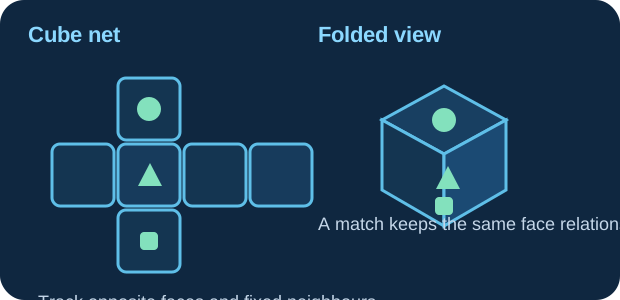
A fast way to check a cube-folding question is to anchor one face, then test whether the other marked faces keep the same relationship.
- Faces opposite each other in the net cannot touch on the folded cube.
- A mirror image is not the same as a true rotation.
- Check one pair at a time instead of trying to rotate the whole cube at once.
MIC — Coordination and multitasking
Practice coordinating instrument-control tasks with a separate digit-monitoring workload. The module involves continuous attention and can be used with supported controls, including a joystick.
How to practice
Before increasing difficulty, confirm that keyboard or joystick controls respond correctly. For a connected joystick, review axis mapping and dead-zone settings. Keep a steady control strategy, then progressively incorporate the listening or monitoring task.
What to review
Look for consistency rather than abrupt corrections. The module is a training simulation and is not a flight simulator or an official assessment.
OWT — Instrument reading
Work on recognising instrument values accurately when observation time is limited. The exercise combines rapid visual interpretation with short-term recall.
How to practice
Use a repeatable observation order. At first, give yourself enough time to read each instrument carefully. Later, work toward faster responses while checking whether accuracy remains stable.
What to review
If results drop sharply, return to an easier setting and refine your scanning method instead of prioritising speed alone.
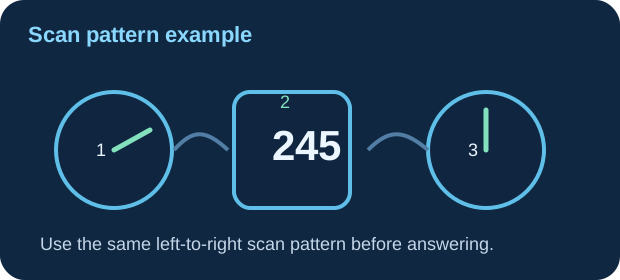
OWT becomes easier when you stop “jumping around” the panel and instead read the instruments in a repeatable order.
- Pick a fixed scan path, for example
left → centre → right. - Read carefully first, then build speed while protecting accuracy.
- If one instrument causes most errors, isolate it and slow down your scan for that step.
SKT — Rule-based concentration
Respond to visual patterns using a set of rules. The challenge lies in maintaining attention and choosing the correct response for each stimulus.
How to practice
Understand each rule before beginning a timed session. Use a consistent decision order instead of reacting impulsively, and increase pace only when the response pattern feels reliable.
What to review
Compare errors made under time pressure with errors caused by misunderstanding a rule; they may call for different practice strategies.
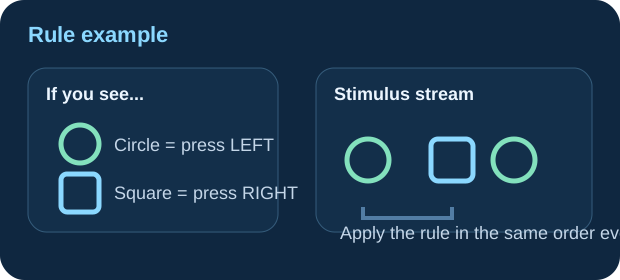
Think of SKT as a quick rule-checking routine: identify the symbol, apply the matching rule, then respond.
- Learn the rule set first, before chasing speed.
- Use one internal order: “see → identify → apply → answer”.
- Most avoidable mistakes come from rushing the rule, not from the symbol itself.
KRN-A — Spoken mental arithmetic
Solve calculations presented through audio. Unlike printed arithmetic, the spoken format asks you to retain numbers and operations while computing the answer.
How to practice
Listen for the operation and the order of the values. Break the arithmetic into small intermediate steps when possible, and avoid adding unnecessary mental steps that may be hard to remember.
What to review
Practice with working audio and minimal distractions. Gradually raise difficulty after you can maintain accuracy on comparable calculations.
KRN-V — Visual mental arithmetic
Solve visually displayed mathematical problems under practice conditions. The emphasis is on maintaining both numerical accuracy and a workable pace.
How to practice
Identify the operation before calculating. Where it helps, use estimation to catch large mistakes, but confirm the final numerical answer with the operation presented.
What to review
Review whether mistakes come from the calculation itself, reading the question too quickly or responding before checking the result.
WFG — Route and direction orientation
Follow a sequence of movements or turns and determine the requested direction or route relationship. The exercise builds systematic spatial tracking.
How to practice
Establish your starting orientation first. Follow each turn in sequence, updating the heading mentally before moving to the next instruction. A simple internal reference frame is often more reliable than guessing from the final overall shape.
What to review
As you practice, watch for confusion between left and right turns or between the direction you face and the direction you travel.
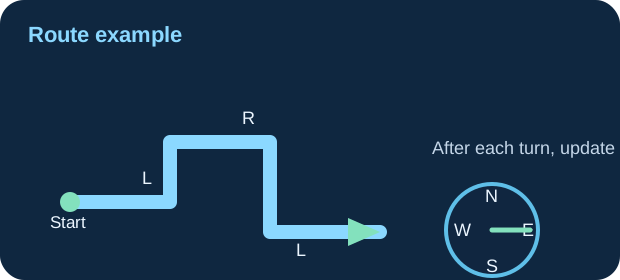
In WFG, a clean mental sequence is more reliable than “eyeballing” the route.
- Choose a clear start direction first.
- After each left or right turn, update your heading immediately.
- Separate where you are facing from where the path seems to point overall.
VMC — Visual n-back memory
Compare current visual information with an item presented a specified number of positions earlier. N-back tasks test your ability to update and compare information over a sequence.
How to practice
Start with a lower n-back level and focus on the attribute requested by the current rule. Respond to actual matches while avoiding guesses on similar but nonmatching items.
What to review
Track both missed matches and false alarms. A higher number of responses is not necessarily better if accuracy falls.
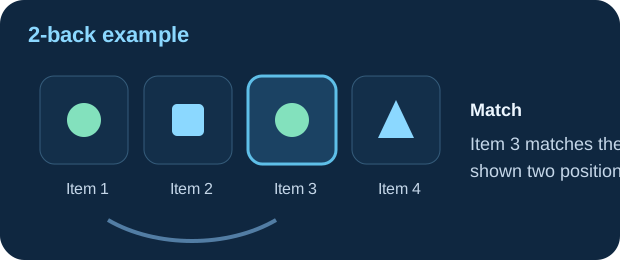
VMC becomes much clearer when you focus only on the current comparison rule instead of trying to remember the whole sequence at once.
- At 1-back, compare with the immediately previous item.
- At 2-back, compare with the item two places earlier.
- Avoid pressing on “almost matches” — missed matches and false alarms are both worth reviewing.
ENS — English practice
Practice questions involving English grammar, vocabulary and comprehension. This module supports general language readiness rather than certifying any proficiency level.
How to practice
Read the full question and all options before choosing. When you miss an answer, identify whether the issue was vocabulary, grammar, misunderstanding of the sentence or rushing.
What to review
Complement multiple-choice practice with reading and listening to varied English material. The trainer is not an official language qualification.
Build a repeatable practice routine
Choose one or two skills per session instead of attempting every exercise at maximum difficulty. Begin with a few attempts at a comfortable level, then increase the challenge only when your results become consistent.
Review trends, not isolated scores: compare attempts at similar difficulty and note whether errors come from the rules, speed or distractions. Export your JSON backup periodically, because results stay in the browser and are not synchronised across devices.
These exercises build familiarity with the skills involved; they do not predict an official assessment result.
Pilot Aptitude Trainer is an independent educational tool. It is not affiliated with, approved by or endorsed by DLR, airlines or any official selection organisation. The content is for training only and cannot guarantee an assessment outcome.